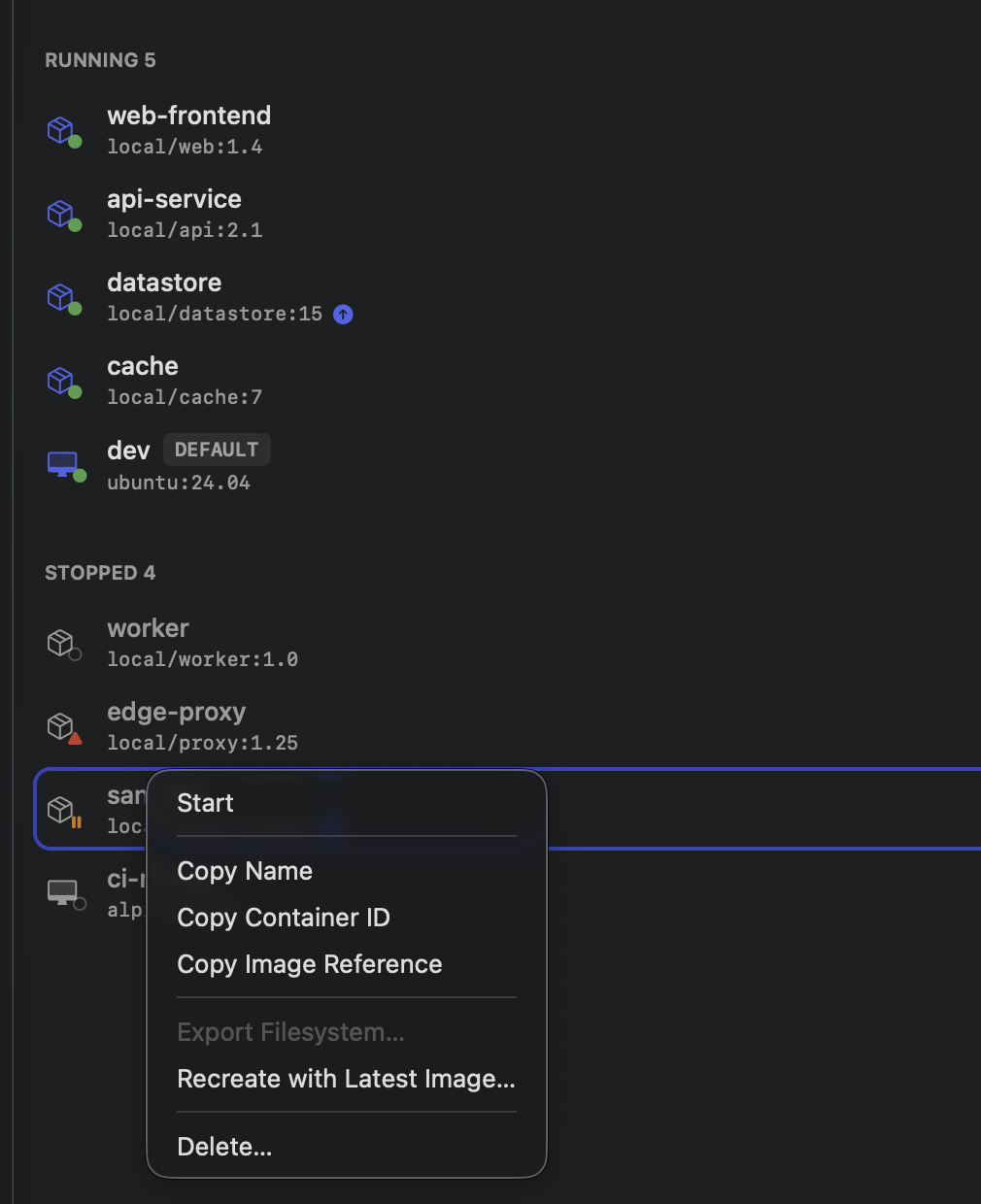
Recreate with the latest image
A container doesn’t know its image got old. You pulled postgres:16 three months ago, the
maintainers have shipped a dozen patch builds since, and your container is still happily running
the first one — nothing about docker ps/container list says so. On the Docker side this is
what Watchtower exists to fix: watch the registry,
notice the tag moved, recreate the container from the new image.
Berthly now does the Berthly version of that. No daemon running in the background polling everything you own — a quiet, on-demand check that badges what’s actually behind, and a Recreate with Latest Image action that does the pull-stop-delete-create-start dance for you.
What it looks for
Two different kinds of “behind,” and Berthly tells them apart:
- The registry moved. You pulled a tag, nobody’s touched it since, and upstream shipped a new build. Both the image row and the containers running it get a small update badge.
- You already pulled, you just haven’t recreated. Maybe you ran
Pull Latestyourself, or another container using the same tag already triggered a fresh pull. The image itself is current — only the container’s still running the old bytes.
The distinction matters because it changes what Recreate has to do: the first case needs a real network pull first; the second doesn’t need the network at all, just a stop, a delete, and a fresh container from what’s already sitting in the local store.
Checking without pulling
The check itself is a single HEAD request per image — RegistryClient.resolve(name:tag:) against
the registry’s manifest endpoint, comparing the digest it hands back against what’s already
local. No image bytes move. This is the same trick Watchtower relies on: a manifest HEAD doesn’t
count against Docker Hub’s pull-rate limits, so checking on launch and every six hours costs
nothing meaningful, and a manual “Check for Updates” button in the Images toolbar bypasses the
schedule entirely.
The one wrinkle: apple/container doesn’t always store the digest you’d expect. When a pulled tag’s remote root is a single manifest rather than a multi-platform index, the daemon wraps it in a synthesized index of its own, annotated to say so. Compare that wrapper’s digest against the registry’s real one and you’ll see a mismatch forever — a permanent false positive on every single-platform image. The fix is a few lines that unwrap the synthetic index before comparing, mirroring a package-internal helper that isn’t public API. Small detail, but skip it and the badge lies to you on day one.
Recreating without losing anything you meant to keep
Recreate reads the container’s full stored configuration — mounts, networks, DNS, labels,
resources — swaps in the freshly pulled image’s descriptor, and rebuilds from that. Named volumes
survive, because they’re mounts, not part of the container’s own filesystem. What doesn’t survive
is anything written directly into the container itself outside a mount — recreate discards the
writable layer, same as a fresh run would, and the confirmation sheet says so before you click
through.
The one setting that quietly doesn’t carry over: Remove when stopped. The daemon’s own
snapshot of a container’s configuration never records whether it was created with --rm, so
there’s nothing for Berthly to read back and reapply. If a container happens to be --rm’d,
stopping it during recreate can make it vanish out from under the delete step that comes next —
handled by treating a “not found” delete as confirmation the container is already gone, not a
failure, and continuing on to create the replacement.
The bug the feature’s own tests found
Getting real confidence in any of this meant a real-daemon end-to-end test: stand up a local registry, publish a build, pull it, run a container, publish a second build behind the same tag, check, recreate, confirm the new bytes landed and the badge cleared. It passed. Sometimes.
The flake was specific: after Pull Latest fetched a genuinely newer image, the badge on that
row would sometimes just… stay. Not every time. Widening the wait didn’t help — sometimes thirty
seconds wasn’t enough, sometimes five was plenty. A container image ls run at the exact moment
of failure showed the correct new digest already sitting in the local store. The data was right.
The screen wasn’t.
A temporary trace confirmed it: the view’s own badge computation simply stopped being called for
that row, at all, the moment the digest changed. Not slow — never invoked again. Which pointed
at one specific, familiar culprit: ContainerImage’s custom Equatable.
static func == (lhs: Self, rhs: Self) -> Bool { lhs.id == rhs.id && lhs.usage == rhs.usage }ForEach uses Equatable to decide whether an element at a stable identity needs its row
re-evaluated. id unchanged, usage unchanged, digest quietly different — as far as ForEach
was concerned, nothing worth redrawing had happened, so it never asked the row to look again.
The interesting part is that this codebase had already investigated this exact bug class, for
this exact model, and concluded it was safe. The image row doesn’t take a ContainerImage by
value from ForEach — it takes an id, and looks the model up live from the shared service inside
its own body. The earlier conclusion was that this makes the row immune: reading an observed
property inside body should register its own fresh dependency, independent of whatever ForEach
decides. That reasoning is half right and the half that’s wrong is the half that matters —
ForEach’s decision to skip a row happens before the row’s body ever runs. A dependency you’d
form by being invoked doesn’t help if you’re the thing that never got invoked.
The fix is one clause:
static func == (lhs: Self, rhs: Self) -> Bool {
    lhs.id == rhs.id && lhs.usage == rhs.usage && lhs.digest == rhs.digest
}
Two clean end-to-end runs later, badges clear the moment the pull finishes, every time.
The lesson isn’t new, but it’s worth restating precisely: an id-based lookup makes a row’s
content independent of what ForEach passes it — it does nothing for whether the row gets
re-evaluated at all. If a model has a custom Equatable, every field the UI renders or gates
behavior on has to be in it, full stop, regardless of how cleverly the row avoids depending on the
value directly.
Where it lives
Registry-update badges show up on the Images page and on any container running a stale tag; right-click a container for Recreate with Latest Image…, or an image for Pull Latest. If you’ve told Berthly a registry is insecure once — pulling, pushing, running, or signing in with the toggle on — it remembers that host for these background checks too, with a list in Settings to review or forget what it’s remembered.